HRI-3622 Remote Commands
This article describes some common remote commands that you can issue through the LoRaWAN server to achieve remote control of the device.
The port number is 3.
Query device parameters
Description |
Command type |
ADR |
Confirm |
Interval |
DR |
Power |
Timezone |
Battery Voltage |
Firm version |
Battery level |
|---|---|---|---|---|---|---|---|---|---|---|
Length |
1byte |
1byte |
1byte |
2byte |
1byte |
1byte |
2byte |
2byte |
2byte |
1byte |
Query |
00 |
|||||||||
Feedback |
00 |
00 |
01 |
00 64 |
01 |
16 |
00 08 |
|||
Error Feedback |
00 |
FF |
ADR:
01represents ADR, and00represents fixed DR.Confirm:
01represents confirm, and00represents no confirm.Interval: LoRaWAN reporting interval, HRI-3633 will send the valve status to the server according to the Interval. In hexadecimal, in seconds. In this sample,
64means 100 seconds.DR: When fixed DR is enable. In this sample,
01means DR 1.Power: RF power, unit’dbm’. In hexadecimal, in seconds. In this sample ,
16means 22dbm.Timezone:
00represents East,01represents West. Example00 08means East 8.
Set device parameters
Description |
Command type |
ADR |
Confirm |
Interval |
DR |
Power |
Timezone |
|---|---|---|---|---|---|---|---|
Length |
1byte |
1byte |
1byte |
2byte |
1byte |
1byte |
2byte |
Query |
01 |
00 |
01 |
00 64 |
01 |
16 |
00 08 |
Feedback |
01 |
00 |
01 |
00 64 |
01 |
16 |
00 08 |
Error Feedback |
01 |
FF |
ADR:
01represents ADR, and00represents fixed DR.Confirm:
01represents confirm, and00represents no confirm.Interval: LoRaWAN reporting interval, HRI-3633 will send the valve status to the server according to the Interval. In hexadecimal, in seconds. In this sample,
64means 100 seconds.DR: When fixed DR is enable. In this sample,
01means DR 1.Power: RF power, unit’dbm’. In hexadecimal, in seconds. In this sample ,
16means 22dbm.Timezone:
00represents East,01represents West. Example00 08means East 8.
Query GPIO status
Description |
Command type |
Quantity |
Mode Change |
Mode |
Status |
|---|---|---|---|---|---|
Length |
1byte |
1byte |
2byte |
2byte |
2byte |
Query |
02 |
||||
Feedback |
02 |
02 |
00 03 |
00 03 |
00 03 |
Error |
02 |
FF |
Quantity: Quantity of GPIO.
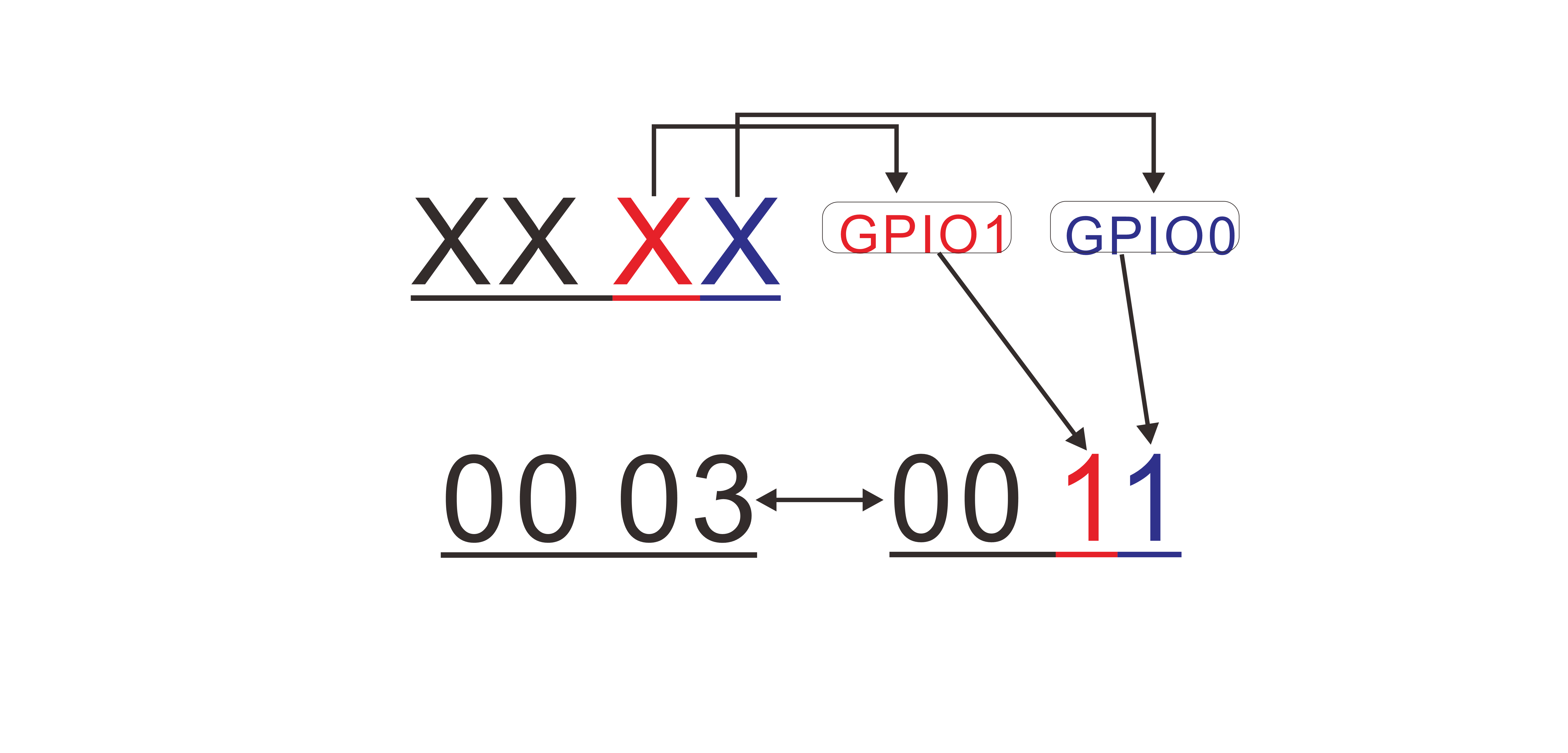
Mode Change: Each bit representing the state of a GPIO.
0means “Mode change enable”,1means “mode change disable”. In this sample, hexadecimal value03converted to binary value “11”, means 2 GPIO are “change enable”.Mode 2byte: Each bit representing the state of a GPIO.
0means “input”,1means “output”. In this sample, hexadecimal value03converted to binary value “11”, means 2 GPIO are “output”.Status: Use 4 bits represent the state of a GPIO, and each representing the state of a GPIO.
0means “low”,1means “high”. In this sample, hexadecimal value03converted to binary value “11”, means 2 GPIO are “high”.
Set a single GPIO state
Description |
Command type |
Quantity |
Number |
Mode |
State |
|---|---|---|---|---|---|
Length |
1byte |
1byte |
1byte |
1byte |
1byte |
Set |
03 |
00 |
01 |
00 |
00 |
Feedback |
03 |
00 |
01 |
00 |
00 |
Error |
03 |
00 |
FF |
Quantity:
00means set a single GPIO.Mode:
0means ‘input’,1means ‘output’.State:
00means ‘low’,01means ‘high’.
Set multiple GPIO states
Description |
Command type |
Quantity |
Number |
Mode |
State |
|---|---|---|---|---|---|
Length |
1byte |
1byte |
2byte |
2byte |
1byte |
Set |
03 |
01 |
00 03 |
00 03 |
00 01 |
Feedback |
03 |
01 |
01 |
00 |
00 |
Error |
03 |
01 |
FF |
Quantity:
01means set multiple GPIO.Number: Each bit representing a GPIO. In this sample, hexadecimal value
03converted to binary value “11”, means 2 GPIO will be set.Mode: Each bit representing a GPIO. In this sample, hexadecimal value
03converted to binary value “11”, means GPIO0 is ‘high’ and GPIO1 is ‘high’.
Query RS485 commands
Description |
Command type |
Number |
State |
Operation type |
Time(Hour) |
Time(minute) |
Repeat |
|---|---|---|---|---|---|---|---|
Length |
1byte |
1byte |
1byte |
1byte |
1byte |
1byte |
1byte |
Query |
06 |
01 |
|||||
Feedback |
06 |
01 |
01 |
00 |
13 |
10 |
7F |
Error |
06 |
FF |
Number: Command number on the configuration page, 0~15.
State: Command state,
01means enable,00means disable.Operation type:
00means periodic command,01means timed task.Time(hour): Which hour in a timed task, in this sample,
13means 1 p.m. When “Operation type” is00(periodic), this section is invalid.Time(minute): Which minute in one hour in a timed task, in this sample,
10means 13:10. When “Operation type” is00(periodic), this section is invalid.Repeat: The way of repeat about timed task. We use 8 bits from low to high, representing Sunday to Saturday. For each bit,
0means don’t operation,1means operation, then converted to hexadecimal. In this sample,7F== ‘0111 1111’, means this command operation everyday.
Day |
N.A |
SAT |
FRI |
THU |
WED |
TUE |
MON |
SUN |
|---|---|---|---|---|---|---|---|---|
Binary |
0 |
1 |
1 |
1 |
1 |
1 |
1 |
1 |
Hex |
7F |
Set RS485 commands
Description |
Command type |
Number |
State |
Operation type |
Time(Hour) |
Time(minute) |
Repeat |
|---|---|---|---|---|---|---|---|
Length |
1byte |
1byte |
1byte |
1byte |
1byte |
1byte |
1byte |
Setting |
07 |
01 |
01 |
00 |
13 |
10 |
7F |
Feedback |
07 |
01 |
01 |
13 |
10 |
7F |
|
Error |
07 |
FF |
Number: Command number on the configuration page, 0~15.
State: Command state,
01means enable,00means disable.Operation type:
00means periodic command,01means timed task.Time(hour): Which hour in a timed task, in this sample,
13means 1 p.m. When “Operation type” is00(periodic), this section is invalid.Time(minute): Which minute in one hour in a timed task, in this sample,
10means 13:10. When “Operation type” is00(periodic), this section is invalid.Repeat: The way of repeat about timed task. We use 8 bits from low to high, representing Sunday to Saturday. For each bit,
0means don’t operation,1means operation, then converted to hexadecimal. In this sample,7F== ‘0111 1111’, means this command operation everyday.
Day |
N.A |
SAT |
FRI |
TH |
WED |
TUE |
MON |
SUN |
|---|---|---|---|---|---|---|---|---|
Binary |
0 |
1 |
1 |
1 |
1 |
1 |
1 |
1 |
Hex |
7F |