Heltec ESP32 Extended Library
This article describes the installation of the Heltec ESP32 extended library.
Heltec ESP32 Library contains extended examples such as LoRa/LoRaWAN related examples, factory test code, display related example code, Sensor example code, GPS example code, and more.
Required Framework
The framework the library depends on, you can choose any of them:
Framework already includes a lot of basic sample code, such as WIFI, BLE, I2C, SPI, HTTP, etc.
警告
Framework v3.0.0 and Library v2.0.0 are updated together, Older frameworks and libraries are no longer applicable to the new ones.
Installation
There are two methods to install the library, choose one of they:
Via Arduino IDE
Click on the Library Manager icon on the left side, search for “HELTEC ESP32”, select the latest version and install

Via Git
You can refer to this link:
-
Follow the instructions in the
Readme.MDto install.
How to use
Connect your node to the computer with a USB cable.
Open Arduino IDE, Correctly select a board and relevant options in the
Toolsmenu:
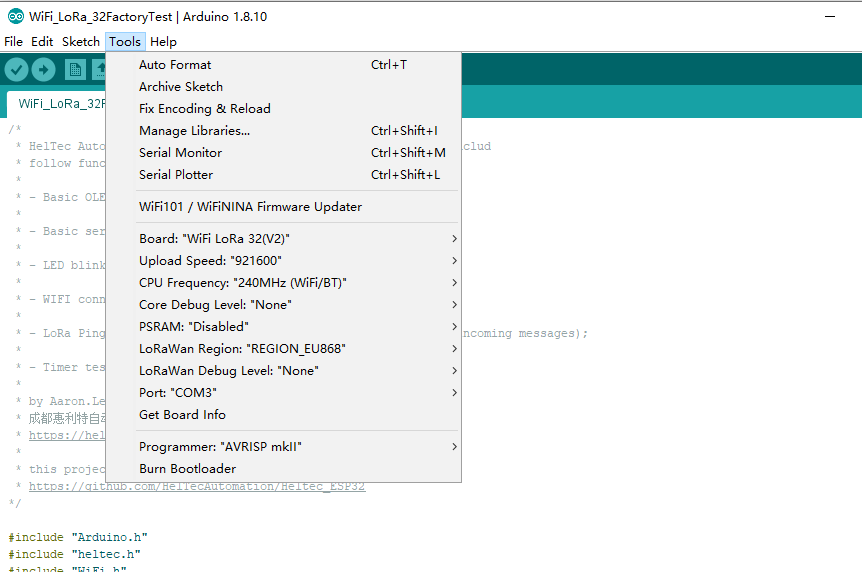
Then select an example.

To execute the code in a library, you need to mouse over, scroll down, find the library, and find the code in it.

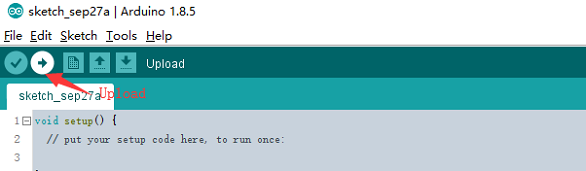
Compile & Upload
小技巧
If you cannot upload the code, please manually enter the BOOTLOADER mode: hold down the PRG (USER/BOOT) key and do not release it, press the RST key once, and then release the PRG (USER/BOOT).